Anomaly Detection#
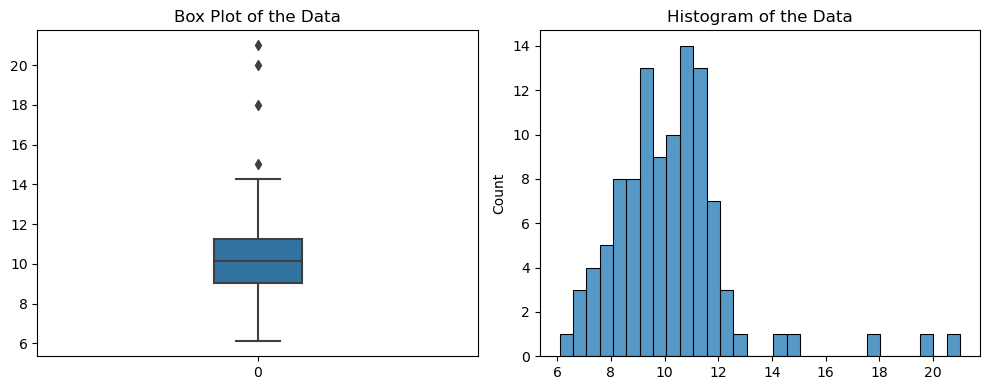
As an example, 100 samples are generated from a normal distribution with a mean of 10 and standard deviation of two. Then, three outliers are added manually (15, 20, 25).
Show code cell source
import numpy as np
import pandas as pd
import seaborn as sns
import matplotlib.pyplot as plt
from sklearn.ensemble import IsolationForest
from sklearn.inspection import DecisionBoundaryDisplay
from sklearn.cluster import DBSCAN
from sklearn.preprocessing import StandardScaler
from scipy import stats
import warnings
warnings.simplefilter(action='ignore', category=FutureWarning)

plt.rcParams['figure.figsize'] = (10, 4)
rng = np.random.default_rng(seed=42)

mean = 10
std_dev = 2
outliers = [15, 18, 20, 21]
for observation in outliers:
    z = (observation - mean) / std_dev # Find z-score
    probability = stats.norm.cdf(z)
    print(f"The probability of observing a value less than or equal to {observation} is {probability:.6f}")

x = np.append(rng.normal(mean, std_dev, 100), outliers)
df = pd.DataFrame({'x': x})
df['y'] = rng.normal(mean, std_dev, len(df['x']))

# It's a good practice to scale the data
scaler = StandardScaler()
scaled_data = scaler.fit_transform(df[['x', 'y']])

fig, axs = plt.subplots(1, 2)
sns.boxplot(x, width=.2, ax=axs[0])
axs[0].set_title('Box Plot of the Data')
sns.histplot(x, bins=30, kde=False, ax=axs[1])
axs[1].set_title('Histogram of the Data')
plt.tight_layout()
plt.show()
The probability of observing a value less than or equal to 15 is 0.993790
The probability of observing a value less than or equal to 18 is 0.999968
The probability of observing a value less than or equal to 20 is 1.000000
The probability of observing a value less than or equal to 21 is 1.000000
Interquartile Range (IQR)#
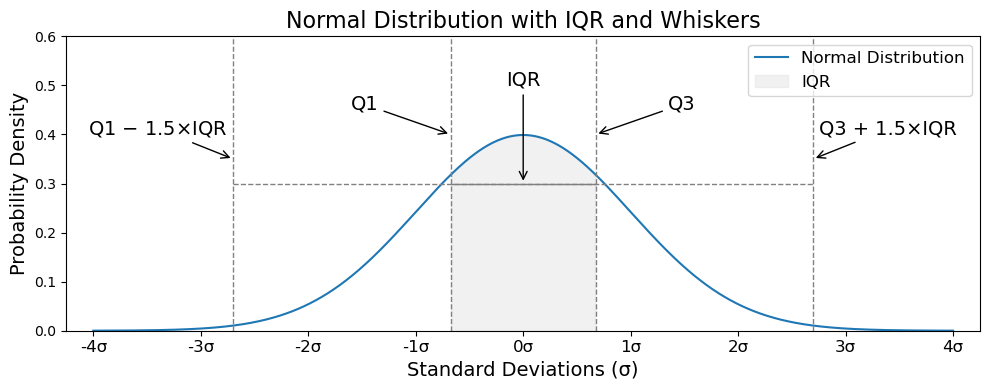
For outlier detection, a good rule of thumb is to investigate points that fall outside of \(\text{Q}1 - 1.5 * \text{IQR}\) or \(\text{Q}3 + 1.5 * \text{IQR}\).
Q1 = df['x'].quantile(0.25) # 25th percentile
Q3 = df['x'].quantile(0.75) # 75th percentile
IQR = Q3 - Q1
lower_bound = Q1 - 1.5 * IQR
upper_bound = Q3 + 1.5 * IQR
print(f"Lower bound: {lower_bound:0.2f}")
print(f"Upper bound: {upper_bound:0.2f}")

outliers = df[(df['x'] < lower_bound) | (df['x'] > upper_bound)]
outliers[['x']].rename(columns={'x': 'outliers'})
Lower bound: 5.74
Upper bound: 14.53
| outliers | |
|---|---|
| 100 | 15.0 |
| 101 | 18.0 |
| 102 | 20.0 |
| 103 | 21.0 |
Show code cell source
x = np.linspace(-4, 4, 1000)
y = stats.norm.pdf(x, 0, 1)
Q1 = -0.6745
Q3 = 0.6745
IQR = Q3 - Q1
lower_whisker = Q1 - 1.5 * IQR
upper_whisker = Q3 + 1.5 * IQR

fig, ax = plt.subplots()
ax.plot(x, y, color='tab:blue', label='Normal Distribution')
ax.fill_between(x, 0, y, where=(x >= Q1) & (x <= Q3), color='lightgrey', alpha=0.3, label='IQR')

ax.annotate('IQR', xy=(0, 0.3), xytext=(0, 0.5), color='black', fontsize=14,
            ha='center', arrowprops=dict(arrowstyle='->'))
ax.annotate('Q1', xy=(Q1, 0.4), xytext=(Q1 - 0.8, 0.45), color='black', fontsize=14,
            ha='center', arrowprops=dict(arrowstyle='->'))
ax.annotate('Q3', xy=(Q3, 0.4), xytext=(Q3 + 0.8, 0.45), color='black', fontsize=14,
            ha='center', arrowprops=dict(arrowstyle='->'))
ax.annotate('Q1 $-$ 1.5×IQR', xy=(lower_whisker, 0.35), xytext=(lower_whisker - 0.7, 0.4),
            color='black', fontsize=14, ha='center', arrowprops=dict(arrowstyle='->'))
ax.annotate('Q3 + 1.5×IQR', xy=(upper_whisker, 0.35), xytext=(upper_whisker + 0.7, 0.4),
            color='black', fontsize=14, ha='center', arrowprops=dict(arrowstyle='->'))

# Vertical lines
ax.axvline(Q1, color='grey', linestyle='--', linewidth=1)
ax.axvline(Q3, color='grey', linestyle='--', linewidth=1)
ax.axvline(lower_whisker, color='grey', linestyle='--', linewidth=1)
ax.axvline(upper_whisker, color='grey', linestyle='--', linewidth=1)

# Horizontal lines for IQR and whiskers
ax.hlines(y=0.3, xmin=Q1, xmax=Q3, color='grey', linewidth=1)
ax.hlines(y=0.3, xmin=lower_whisker, xmax=upper_whisker, color='grey', linestyle='--', linewidth=1)

# Set x-limits and ticks
ax.set_xlim([-4.25, 4.25])
ax.set_ylim([0, 0.6])
ax.set_xticks(np.arange(-4, 5, 1))
ax.set_xticklabels([f'{i}σ' for i in range(-4, 5)], fontsize=12)
ax.set_xlabel('Standard Deviations (σ)', fontsize=14)
ax.set_ylabel('Probability Density', fontsize=14)
ax.set_title('Normal Distribution with IQR and Whiskers', fontsize=16)
ax.legend(fontsize=12)
plt.tight_layout()
plt.show()
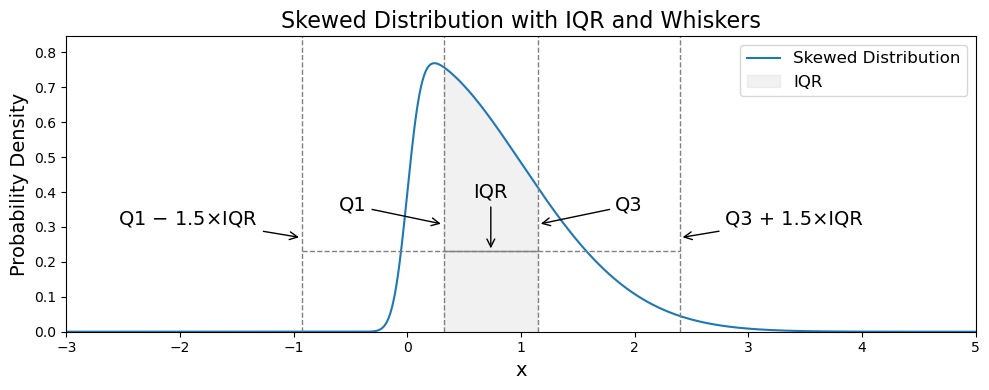
In skewed distributions, the data may have extreme values or outliers in the direction of the skew. The presence of skewness might lead to misclassifying values near the tails as outliers or failing to detect true outliers.
Alternatives such as the median absolute deviation (MAD) or transformations (e.g., log transformation) may help better capture the variability and deal with the effects of skewness.
Show code cell source
# Parameters for the skew-normal distribution
a = 10  # Skewness parameter (positive for right skew)
loc = 0  # Location parameter (mean)
scale = 1  # Scale parameter (standard deviation)

x = np.linspace(-4, 8, 1000)
y = stats.skewnorm.pdf(x, a, loc, scale)
Q1 = stats.skewnorm.ppf(0.25, a, loc, scale)
Q3 = stats.skewnorm.ppf(0.75, a, loc, scale)
IQR = Q3 - Q1
lower_whisker = Q1 - 1.5 * IQR
upper_whisker = Q3 + 1.5 * IQR

fig, ax = plt.subplots()
ax.plot(x, y, color='tab:blue', label='Skewed Distribution')
ax.fill_between(x, 0, y, where=(x >= Q1) & (x <= Q3), color='lightgrey', alpha=0.3, label='IQR')

ax.annotate('IQR', xy=((Q1 + Q3) / 2, 0.3 * y.max()), xytext=((Q1 + Q3) / 2, 0.5 * y.max()),
            color='black', fontsize=14, ha='center', arrowprops=dict(arrowstyle='->'))
ax.annotate('Q1', xy=(Q1, 0.4 * y.max()), xytext=(Q1 - 0.8, 0.45 * y.max()),
            color='black', fontsize=14, ha='center', arrowprops=dict(arrowstyle='->'))
ax.annotate('Q3', xy=(Q3, 0.4 * y.max()), xytext=(Q3 + 0.8, 0.45 * y.max()),
            color='black', fontsize=14, ha='center', arrowprops=dict(arrowstyle='->'))
ax.annotate('Q1 $-$ 1.5×IQR', xy=(lower_whisker, 0.35 * y.max()), xytext=(lower_whisker - 1, 0.4 * y.max()),
            color='black', fontsize=14, ha='center', arrowprops=dict(arrowstyle='->'))
ax.annotate('Q3 + 1.5×IQR', xy=(upper_whisker, 0.35 * y.max()), xytext=(upper_whisker + 1, 0.4 * y.max()),
            color='black', fontsize=14, ha='center', arrowprops=dict(arrowstyle='->'))

# Vertical lines
ax.axvline(Q1, color='grey', linestyle='--', linewidth=1)
ax.axvline(Q3, color='grey', linestyle='--', linewidth=1)
ax.axvline(lower_whisker, color='grey', linestyle='--', linewidth=1)
ax.axvline(upper_whisker, color='grey', linestyle='--', linewidth=1)

# Horizontal lines for IQR and whiskers
ax.hlines(y=0.3 * y.max(), xmin=Q1, xmax=Q3, color='grey', linewidth=1)
ax.hlines(y=0.3 * y.max(), xmin=lower_whisker, xmax=upper_whisker, color='grey', linestyle='--', linewidth=1)

# Set x-limits and ticks
ax.set_xlim([-3, 5])
ax.set_ylim([0, 1.1 * y.max()])
ax.set_xticks(np.arange(-3, 6, 1))
ax.set_xlabel('x', fontsize=14)
ax.set_ylabel('Probability Density', fontsize=14)
ax.set_title('Skewed Distribution with IQR and Whiskers', fontsize=16)
ax.legend(fontsize=12)
plt.tight_layout()
plt.show()
Z-Score#
A common threshold for identifying outliers is a Z-score greater than 3 or less than -3.
df['z_score'] = stats.zscore(df['x'])
df[abs(df.z_score) >= 3][['x', 'z_score']]
| x | z_score | |
|---|---|---|
| 101 | 18.0 | 3.396053 |
| 102 | 20.0 | 4.270226 |
| 103 | 21.0 | 4.707313 |
Gaussian Mixture Models (GMM)#
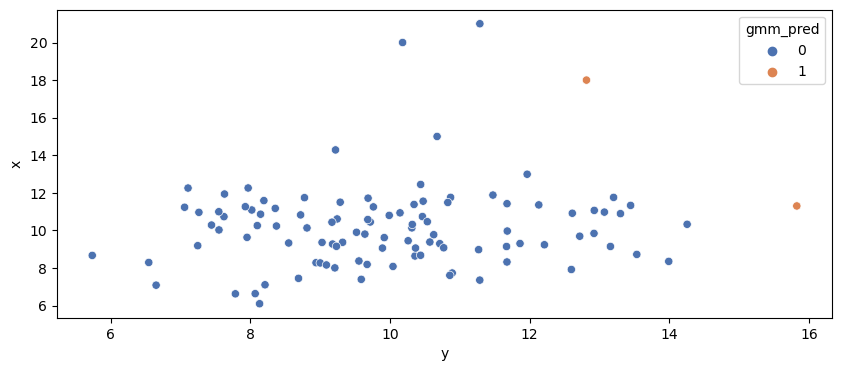
Models the data distribution as a mixture of several Gaussian distributions. Points with low probability under the model are flagged as anomalies.
Show code cell source
from sklearn.mixture import GaussianMixture

gmm = GaussianMixture(n_components=2, covariance_type='full', random_state=42)
gmm.fit(scaled_data)

probs = gmm.score_samples(scaled_data)
threshold = np.percentile(probs, 1)  # Top 1% as anomalies
y_pred = np.where(probs < threshold, 1, 0)  # 1: anomaly, 0: normal
df['gmm_pred'] = y_pred

sns.scatterplot(x='y', y='x', data=df, hue='gmm_pred', palette="deep")
plt.show()
DBSCAN Clustering#
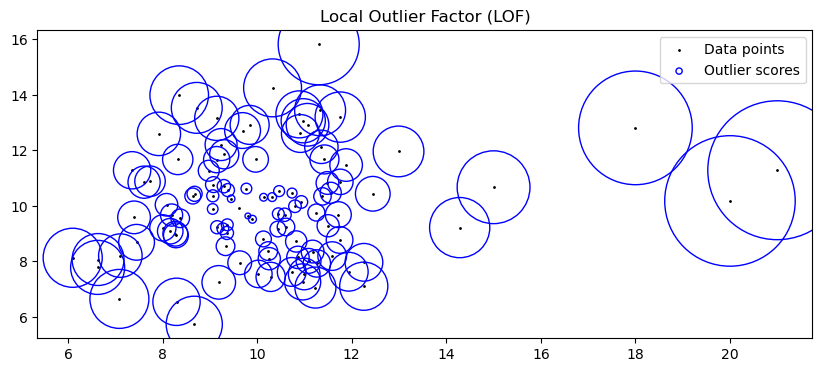
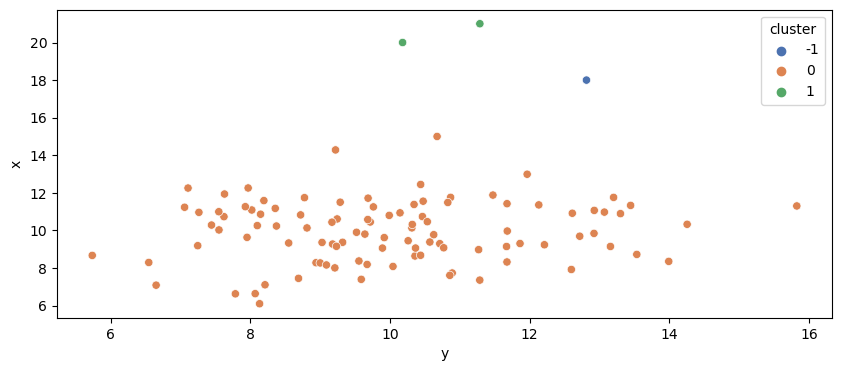
cluster = -1 are considered outliers by DBSCAN
Show code cell source
dbscan = DBSCAN(eps=1.5, min_samples=2)
df['cluster'] = dbscan.fit_predict(scaled_data)

sns.scatterplot(x='y', y='x', data=df, hue='cluster', palette="deep")
plt.show()
Isolation Forest#
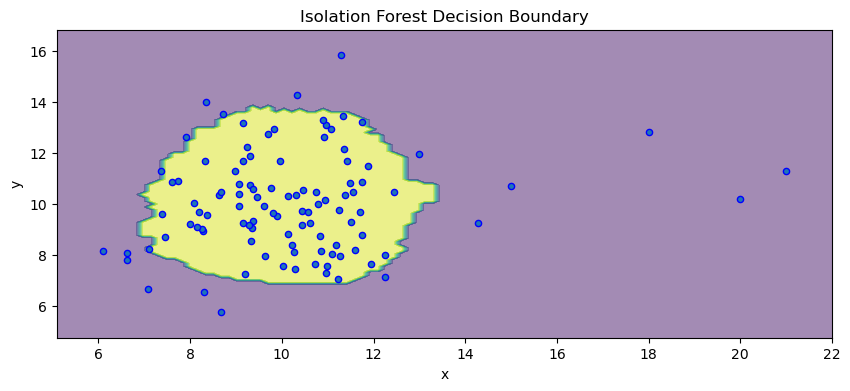
Constructs random trees to isolate anomalies. Since anomalies are few and different, they are easier to isolate, requiring fewer splits.
Show code cell source
clf = IsolationForest(random_state=42).fit(df[['x','y']])

disp = DecisionBoundaryDisplay.from_estimator(clf, df[['x','y']], response_method="predict", alpha=0.5)
disp.ax_.scatter(df['x'], df['y'], s=20, edgecolor="b")
disp.ax_.set_title("Isolation Forest Decision Boundary")
plt.show()
Local Outlier Factor (LOF)#
Show code cell source
from sklearn.neighbors import LocalOutlierFactor
from matplotlib.legend_handler import HandlerPathCollection

clf = LocalOutlierFactor(n_neighbors=50)
y_pred = clf.fit_predict(df[['x','y']])
X_scores = clf.negative_outlier_factor_

def update_legend_marker_size(handle, orig):
    handle.update_from(orig)
    handle.set_sizes([20])

plt.scatter(df['x'], df['y'], color="k", s=1, label="Data points")
radius = (X_scores.max() - X_scores) / (X_scores.max() - X_scores.min())
scatter = plt.scatter(df['x'], df['y'], s=10000 * radius, edgecolors="b", facecolors="none", label="Outlier scores")
plt.legend(handler_map={scatter: HandlerPathCollection(update_func=update_legend_marker_size)})
plt.title("Local Outlier Factor (LOF)")
plt.show()